Archive for the “NPCC” Category

Sorry this is a little later than usual, but prep for Drive has been occupying a lot of time and energy. First let me say that for those of you who aren’t coming down this year, you can stream the first session live Monday night at 7:30pm EST here: http://northpointonline.tv/drive/.

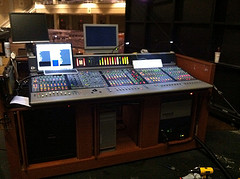
If you’re looking for me at Drive, I’ll be mixing the first session and hanging out at FOH for most of the rest of the main sessions stealing more tricks from Dustin and Chris.

Once again, here is my survival guide for Drive attenders primarily geared towards production folks:


Dave’s DRIVE 2010 Survival Guide

MAIN SESSION TIPS

So let’s talk about the most important thing for production folks: seating. For those who will be attending Drive for the first time, I’m going to once again issue a warning: People can get a little crazy about coming in and getting seats. So if you’re at the front by the doors when they open, be ready for folks behind to run you over. It can be a mad house. I do, however, suggest you get there early to get a good seat for the main sessions. Most people are probably going to line up in the main hallway, so if it was me I would try and line up around the corner by the side doors.

So seating this year is a little different because the new PA offers us really good coverage and much greater consistency than ever before in the room. From an audio perspective, you really can sit just about anywhere. That said, there are a few things to keep in mind. Personally, on the floor I like things closer to the middle where you’ll get a little bit of imaging from the left and right arrays. The center seats also feel closer to the stage if you’re into that. If you like a lot of bass, the first two rows currently thump a little more than the rest of the room, BUT keep in mind those two rows tend to be the most sought after seats, and I’ve seen people do crazy things to sit in them.

If there are any seats I would say to avoid it would be the far left and right sections up front. These seats are literally perpendicular to the stage, and it’s just not a great view unless you want to be able to see the audience reactions. Some of us wonder why we leave those seats in for conferences.

If you are easily distracted by production people and their gear, I highly suggest you sit away from FOH. It’s very hard for folks like us to get a break and experience things so I suggest you do yourself a favor and try and steer clear of the tech for at least the first session. The rows directly in front of FOH might be the perfect seats for you.

***

QUERYING PRODUCTION FOLKS

We are always up for questions and would like to answer as much as time permits us over the course of the conference. The best time to find us is immediately following the main sessions. Audio folks are best found at FOH along with our producers. If you’re a lampi with lighting questions, our lighting booth is located in the large, elevated booth behind FOH on the other side of the aisle.

***

SURVIVING THE AREA

One thing new this year you should know is that the pollen has been really bad so be prepared if you suffer from seasonal allergies. Pharmacy locations are below if you need to run and get something.

Atlanta traffic is quite simply a nightmare. Keep that in mind before you go anywhere, and you’ll probably survive. Georgia 400 is sort of the main highway/expressway/tollway/freeway running between our campuses, and this is where you’ll probably encounter the worst of the traffic during rush hour. The traffic can be very inconsistent from one day to the next so just be prepared to hit it and leave a bit early when you can. North Point Parkway also gets pretty bad starting around 4:30pm, however, I have found it is much easier to go south on North Point Parkway coming out of the church at that time of day. To get to 400, I will take North Point Parkway south to Haynes Bridge (go west) and get on there instead of going north to Old Milton where the left turn lane gets backed up. Note that if you do go south on NP Parkway around rush hour, make sure to stay to the right until you get past Kimball Bridge Road–the left turn lane gets really backed up into the left lane, but the right lane tends to move right through.

If you need supplies of any sort, the nearest grocery store to North Point is probably Publix. It is located west of 400 on Old Milton at the corner of Old Milton and Haynes Bridge Rd. If you take that a little further west to the next light you will hit a couple pharmacies (Walgreens and CVS). Traveling south from North Point on North Point Parkway will take you towards a lot of shopping where you can also find a Target (they have groceries as well) along with North Point Mall where you can find an Apple Store if you need one. There are also a lot of chain restaurants that way(Cheesecake Factory, TGI Fridays, Ruby Tuesdays, Steak and Shake, California Pizza Kitchen, Fuddruckers, etc.).

Gas stations are always hard to find when you need one. If you’re in a rental car, I highly recommend filling up before you drive back to the airport because I have never found a gas station near the airport. The nearest gas station to North Point is just east of Georgia 400 at exit 10 (Old Milton). There’s a Shell station there next to a Waffle House. There is also a gas station west of Georgia 400 at exit 9 (Haynes Bridge Road).

If you’re looking for a good place to get breakfast, I have a couple recommendations. J. Christopher’s is located east of Georgia 400 at Exit 11 (Windward Parkway). You get off there and go maybe a mile or so and there will be a two level shopping center on the right. J. Christopher’s is on the second level, and you’ll need to drive around to the back. If you go west of Georgia 400 at Exit 11 you’ll find a Cracker Barrel just past the exit, and there is also a World Famous Pancake House in the same shopping area.

***

See you at Drive!

Comments 1 Comment »

Amek Media51
Amek Media 51 – Can You Say Neve Preamps?

Last month I had the opportunity to mix the webcast for our night of worship that was webcast via North Point Online. The Sunday night NP Online experience is presently a FOH mix at Buckhead, however, we opted to use our studio facilities for the webcast from North Point.

The studio at North Point is an interesting room. During the week it serves primarily as a post room for audio-for-video along with other miscellaneous export needs such as podcasts, songs for DVD’s, voiceovers, etc. On Sunday morning the studio mixes for tapes while also handling some of the bussing involved in getting audio to campuses when the sermon originates at our campus. We have also used the studio for the tracking of the North Point Live CD’s including the new one coming out this month.

Monitors
Studio Monitors

The heart of the studio is a Pro Tools HD4 rig with a Control24 control surface. Digidesign 192 and 96i interfaces provide analog and digital inputs into Pro Tools with an Amek Media 51 utilized for pre-amps. Our auditorium splits are 3-way with the third feeding the studio giving us the option of taking inputs from either auditorium. Studio monitors are via active Dynaudio BM15’s or Adam A7’s.

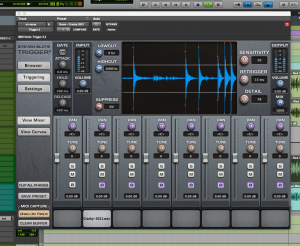
Mixing live in Pro Tools is clunky. For our typical Sunday service with three songs, it’s not so bad, but for a night of worship with lead singers interchanging it was definitely a challenge. I know that they’ve mixed the Grammy’s broadcast live in Pro Tools on ICONs for the last couple of years, but our setup isn’t quite the same so I’ve set up some cheats in Pro Tools to help with mixing.

webcast-tracks.png
Pro Tools Audio Tracks

webcast-auxes.png
Pro Tools Aux Inputs

The control surface is one of the biggest challenges for mixing live in the studio. The Control 24 offers 24 faders, but it’s not always easy to lay them out strategically in the session so you can page or nudge through the channels and have the same faders land in the same place every time. The best case scenario is to try and get the essentials for an event’s mix on 24 faders so you can just sit on those faders for the entire event. Luckily, Pro Tools added VCA’s a few versions ago, however, there are some limitations to these. For starters, VCA’s are tied to Pro Tools’ automation system. The catch is as soon as you enable a track for record, automation on that track is disabled so any VCA associations are also disabled.

The workaround gets a little more complicated, but was actually a suggestion from Digi. All our inputs come in on audio tracks, but are then bussed internally in Pro Tools to Aux inputs. We then mix off the Aux inputs. I look at it sort of like a recording console and a tape machine all in one box. The Audio tracks are the tape machine and the Auxes are the console where they return. Setting up this way allows us to assign the Aux inputs to VCA’s while also gaining a few additional advantages. Using Auxes for mixing allows us to utilize Delay compensation for plugin latency so we can do things like parallel compression. I also like to pull some of the Audio input track faders back a little bit so that I can keep the faders for the Aux inputs I mix off closer to the sweet spot of the console.

Real World Monitors
Real World Monitors

For the webcast specifically, I employed a couple of additional tools for mixing in the studio. The first was a pair of old computer speakers I’ve had for years. Since I was mixing a webcast, I made an assumption that a lot of people would probably be listening at home on not-so-fancy speakers so these served as sort of a real-world reference. I basically just stuck them just to the side of the Control 24 clumped together. I also had a private audio stream setup online so that I could flip over and listen to what the compression codecs were doing during rehearsals. Once I had a basic mix built on the Adams, I spent a lot of time flipping between the computer speakers and the Adam’s. Personally, I’m not a big fan of the Dynaudio’s because everything sounds pretty on them; I’ve done mixes on them that sounded great until I tried to get them to translate outside of the room so I generally only use them as a reference for low end since they have an active subwoofer.

In addition, I also spent a lot of time mixing strictly in mono. We have a Coleman monitor controller which allows us to select from several sources and which studio monitors we listen to, and the Coleman also has a cool little button that makes everything mono. I like to switch into mono and then mute one side of the monitors. Mono mixing is just another one of those real-world references I like to check. Close proximity speakers–even “stereo” ones you might find on a laptop–can play closer to a mono experience than stereo, and I wanted to know what that was going to do to things. I find that things in the center of the stereo mix such as lead vocals can often tend to pop out more in a mono mix so popping between mono and stereo helps me find a compromise in where that stuff sits. My goal in mixing in mono isn’t necessarily to get perfect separation between instruments; I’m mainly trying to ensure that the spirit of the stereo mix is still there along with any essential elements like vocals and leads.

When mixing in the studio, I like to mix at different volumes, and I actually try and spend a decent amount of time mixing at lower volumes. Our studio monitors are calibrated so that the average RMS level is a specific dB level; I believe that -20 dBFS is 83 dBC on the monitors. Calibrated monitors with a fixed gain have been key for film mixing for 30+ years. The beauty of it is you mix everything at a natural level and the levels all work out. Bob Katz has written about this and some different approaches for setting things up, and if you do some more digging on the net you can find more resources on the topic. I probably spend most of my time mixing at the calibrated level whenever I’m in the studio, and then turn things down for periods of time to work on balances a bit. Whenever I was using my little computer speakers, I was pretty much always mixing below our calibrated level.

webcast notes
Mix Notes

The next tool I utilized was as basic as you can get: NOTES. When mixing FOH, I sometimes will add some notes to snapshots on the Venue, but there are no snapshots available when mixing on our Pro Tools setup. Once upon a time I had figured out how to create a single snapshot to get back to a baseline mix, but it always seemed harder than it was worth. I just used one of my little note pads and dedicated a page for each song. After rehearsal as I worked on refining the mix, I took notes on each song. These included things like who was singing lead and harmony, which guitars were playing the cool stuff, places in a song where I needed to bump things, and then any other fader levels I needed to set for the start of the song. Somehow I managed to get everything I needed for the music set down to 24 faders, and in between songs I would quickly go through setting VCA’s where they needed to be.

Overall it was one of the most challenging things I’ve mixed in a while, but it was also a lot of fun. Thanks to everyone for all the great feedback and tweets on the night. I’m glad those of you who were able to tune in enjoyed it. If there’s something else you’d like to know about mixing the night, please fire away in the comments and I’ll try and tell you everything I can remember. I’m including a link to the input list from the night below as well.

Night of Worship – 11.05.09 – Input List

Webcast Rehearsal
Mixing in the Studio
Reference Mix
Webstream Rehearsal Reference

Comments 3 Comments »

Reference Mix

Sorry the posts have been thin for the last few weeks. I have some in the pipeline, but they’re not quite ready, yet. However, I wanted to give you guys a heads up on something coming up fast.

This Thursday night, November 5, North Point Online will be streaming a Night of Worship taking place at North Point, and I will be in the studio for the evening mixing exclusively for the webcast. I will do a breakdown of the whole thing in the near future looking at the different approach for the “broadcast” side along with the technical stuff, but in the meantime I wanted to put the night on your radar if you want to get a taste of it before I talk about it. The event starts at 7:30pm Eastern and will run around 90 minutes.

Next week I’ll be at Dirt Conference in Little Rock, but once I’m back I’ll try and start getting some of those incubating posts up.

Comments Comments Off

700HP.jpg

So the night of the recording went well, and while I can’t say that the day leading up the night was one of the finest, the week leading up to it was awesome. Plus most folks seemed like they had a good time for the night so overall I would say the whole thing was a success.

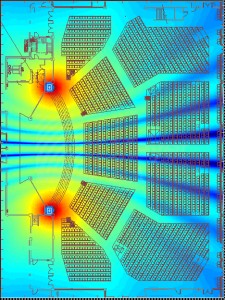
As I mentioned earlier, we once again brought in subs to see how they would play in our room. We brought in 12 Meyer 700HP’s in May to use for the Drive Conference, but this time we opted for 10 Meyer M3D subs. I was really happy with the 700’s at Drive, and the first photo here shows a heat plot for 11 700HP’s roughly in the configuration we had for Drive. Once again, the number of subs has nothing to do with power. It’s all about pattern control. By wrapping around the stage, we get very even coverage across the room. Once you add in wall reflections, what we had at Drive even filled in those cooler sections on the front sides. People can be very finicky about low end, but I’ve been pleasantly surprised at how much better things have been received by using this configuration.

However, one thing you’ll notice with this setup is how much low frequency energy there is on stage. It wasn’t the end of the world for the band when we had these setup at Drive. However, in our typical operation this poses a problem. Our two auditoriums have their stages back to back so on the wall directly behind the stage is another stage, and unfortunately all that energy carries over onto that other stage and into the audience listening area. With two auditoriums running simultaneously ever Sunday, this isn’t an optimal setup. Reports from the west during Drive was they were getting a good workout.

Thankfully there is a potential solution to this: cardioid subs. While traditional subs tend to radiate energy in an almost omni-directional pattern, cardioid subs are configured to cancel in the rear. This is usually achieved by facing a sub in the opposite direction and using the reversed polarity to achieve cancellation. While it is possible to array traditional subs in a fashion that will create a cardioid coverage pattern, it is unfortunately not feasible for us in our current space so the only thing we can really do is look at single enclosures that do the same thing. For the CD Project, we opted to try directional subs to compare against the 700HP’s.

The M3D sub is basically 2 subs in one. There are 2 forward firing 18’s with 2 rear-firing 15’s, and when you try and lift one you really get a sense of everything that’s in the box. They are incredibly heavy weighing just shy of 400 lbs. Load-in was….fun….

M3Dsubs-CDproject.jpg

The second photo here shows the same prediction as the first with the M3D subs in the configuration we had for the CD Project. Again, you can see how even the coverage pattern is, but the main thing to note is the decreased energy on the stage. In practice this was true along with greatly reduced energy in our west auditorium which was a win. The reduction on stage also didn’t seem to bother the band.

Now, in my personal opinion, I preferred the 700HP’s. The 700’s just seemed like they were a little punchier. Going with the M3D subs, however, was barely a compromise. In fact, I received several comments from folks who preferred the M3D’s to the 700’s. Everyone has different tastes, I guess. The output of the M3D subs was also less than the 700’s, but there was still plenty for the room, and I do think the coverage was a little bit more even with only 10 of the M3D subs. If we were going to do something permanent, the lesson learned from the test is that we will definitely need to go with directional subs to make our Sunday programming work.

One last thing to note is once again the sound of our tops was greatly improved with the substitution of the Meyer subs for our current ones. The nice thing about using them this time is I had them right from the beginning of rehearsal where the Drive subs came in the night before. Having them from day one probably made also had an impact in the final mix result since I had 3 days on them instead of less than 24 hours. It was once again sad to them go.

Comments 6 Comments »